Work From Home Setup Ideas for Small Spaces
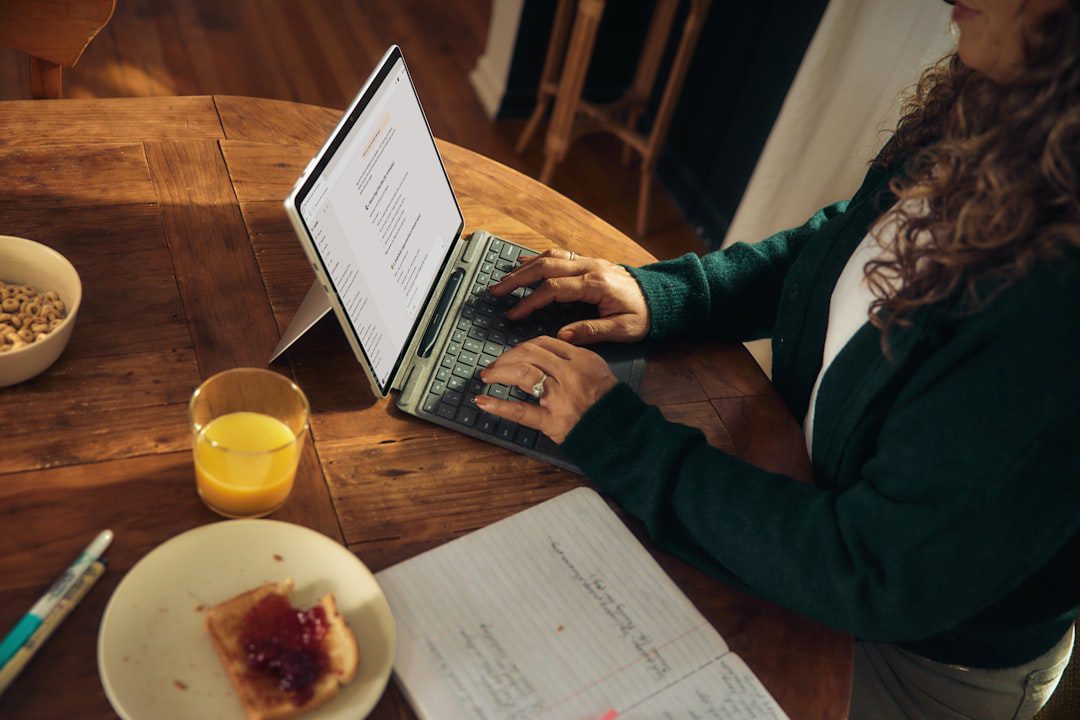
Work From Home Setup Ideas for Small Spaces That Actually Deliver
Most remote workers assume a productive home office requires a spare room. In reality, the best work from home setup ideas for small spaces prove that square footage is overrated. Whether you’re working from a studio apartment, a shared flat, or a converted closet, the right approach transforms any tight corner into a focused, functional workspace. This guide gives you practical, tested strategies — no fluff, no filler.
According to the U.S. Bureau of Labor Statistics, a significant share of employed Americans continue to work remotely at least part of the week. That trend is only growing in 2026. And yet, most home-office advice still assumes you have a dedicated room.
You don’t. So let’s fix that.
Why Small-Space Home Offices Demand a Smarter Strategy
A small workspace isn’t just a physical constraint — it’s a mental one. Clutter in a tight space feels twice as chaotic. Noise bleeds in faster. Boundaries between “work” and “life” blur almost instantly.
However, small spaces also force discipline. You can’t accumulate junk you don’t have room for. You prioritize ruthlessly. As a result, many professionals in compact setups actually report higher focus levels than those with sprawling home offices.
The key is intentionality. Every piece of furniture, every cable, every tool must earn its place.
The Best Work From Home Setup Ideas for Small Spaces in 2026
Let’s get specific. Below are the highest-impact changes you can make, ranked by ease of implementation and return on productivity.
1. The Fold-Down Wall Desk
A fold-down (or “murphy”) desk is the single best investment for studio or one-bedroom apartment workers. When closed, it looks like a sleek cabinet panel. When open, it gives you 24–36 inches of dedicated workspace.
- Top picks in 2026: Models from IKEA’s NORBERG line or Prepac’s wall-mounted options remain popular for their price-to-quality ratio.
- Mount at standing height for optional standing-desk functionality.
- Pair with a backless stool that slides underneath when not in use.
This setup reclaims your floor space the moment your workday ends. Moreover, the physical act of folding the desk down signals your brain to shift into work mode — a built-in ritual.
2. The Closet Office (Cloffice)
The “cloffice” trend exploded in 2024 and has only refined itself since. In short, you convert a closet into a compact office nook.
- Remove the closet door or replace it with a curtain for an open feel.
- Install a custom-cut desktop at desk height using a laminate board from any hardware store.
- Add pegboard or floating shelves above for vertical storage.
- Use LED strip lighting under the top shelf to eliminate shadows on your screen.
A standard reach-in closet (roughly 24 inches deep, 36–60 inches wide) fits a monitor, laptop stand, and keyboard tray with room to spare. Furthermore, having a door — even a curtain — means you can “close the office” at the end of the day.
3. The Corner Desk Configuration
Corner desks use dead space that most people ignore entirely. An L-shaped corner desk gives you two working surfaces in a footprint that feels surprisingly spacious.
- Choose a desk with built-in shelving on the shorter arm to eliminate a separate bookshelf.
- Keep the primary monitor on the longer arm and use the shorter arm as a writing or secondary-task surface.
- Cable management clips along the desk edge keep the space looking clean.
For rooms under 150 square feet, a compact corner desk in the 40″ x 40″ range hits the sweet spot between surface area and footprint.
4. The Dual-Purpose Living Room Setup
Not everyone can sacrifice a corner exclusively to work. For those sharing living space with family or roommates, a dual-purpose setup is the smartest move.
- Use a console table behind a sofa as a standing desk alternative.
- Invest in a laptop riser and a Bluetooth keyboard/mouse combo so your “desk” looks like décor when not in use.
- Store all work supplies in a dedicated rolling cart or caddy that slides under the console table at day’s end.
- A room divider or bookshelf placed strategically creates visual separation between work and living zones.
This approach works especially well for video calls — a sofa or styled bookshelf makes a far better background than a bare wall.
Ergonomics in Small Spaces: Don’t Compromise Your Body
Here’s the hard truth: a cramped, poorly set up workspace causes real physical damage over time. Back pain, neck strain, and wrist injuries are common among remote workers who prioritize aesthetics or convenience over ergonomics.
Therefore, no matter how tight your space, these ergonomic non-negotiables apply:
Monitor Height and Distance
- The top of your screen should sit at or just below eye level.
- Position the monitor 20–28 inches from your face — roughly arm’s length.
- In small spaces, a monitor arm (rather than a stand) frees up significant desk real estate.
Chair and Seating
- If a full ergonomic chair doesn’t fit your space, consider a kneeling chair or saddle stool — both support posture in a smaller footprint.
- Alternatively, add a lumbar support cushion to any chair you already own.
- Your feet should rest flat on the floor, or on a footrest if your chair sits high.
Keyboard and Mouse Placement
- Keep your elbows at roughly 90 degrees when typing.
- A slim, tenkeyless keyboard removes the number pad and immediately gives you 3–4 extra inches of desk space.
If you’re focused on maximizing your output while working remotely, ergonomics is as important as any productivity system. In fact, our guide on attention management tips for professionals covers how physical comfort directly impacts sustained focus.
Lighting, Acoustics, and Ambiance: The Underrated Trio
Most people spend hundreds on gear and nothing on environment. That’s a mistake. Your lighting and acoustic setup has an outsized impact on both your energy and your professionalism on video calls.
Lighting for Small Spaces
- Natural light is king — position your desk perpendicular to windows to avoid glare on screens.
- Add a bias light behind your monitor (an LED strip attached to the back of the screen) to reduce eye strain during long sessions.
- For video calls, a ring light or a simple panel light at face level makes an immediate difference to how you appear on camera.
- Avoid overhead lighting as your only source — it casts unflattering shadows and causes fatigue.
Acoustics and Noise Control
- Rugs absorb echo — even a small area rug under your desk helps.
- Bookshelves lined with books naturally dampen sound.
- A pair of noise-cancelling headphones is non-negotiable if you share your space with others.
- For calls, use a directional USB microphone rather than your laptop’s built-in mic — it picks up your voice while rejecting background noise.
Ambiance and Mental Boundaries
Small spaces blur mental boundaries between work and rest. Combat this with deliberate rituals:
- A scent diffuser with an “office-only” scent anchors your brain to work mode.
- A plant on your desk — even a small succulent — reduces psychological stress, per multiple workplace studies.
- Keep your workspace visually distinct from your relaxation zone, even if they’re in the same room.
Technology Choices That Save Space Without Sacrificing Power
In a small home office, bulky tech is the enemy. Fortunately, 2026’s hardware ecosystem has never been more compact and capable.
Go Wireless Wherever Possible
- A wireless keyboard and mouse eliminate cable clutter instantly.
- A single USB-C hub or dock lets you connect all peripherals through one cable — clean and efficient.
- Consider a compact all-in-one printer (or go paperless entirely — a document scanner app on your phone handles 90% of scanning needs).
The Right Monitor Strategy
- A single 27-inch ultrawide monitor replaces two standard screens with a smaller total footprint.
- Alternatively, a portable monitor (slim, lightweight, powered by USB-C) doubles your screen real estate and stores flat against a wall.
- A monitor arm, as mentioned earlier, raises your screen off the desk and frees the surface below for other use.
Cloud-First File Management
Physical drives and paper files eat space. Moving everything to cloud storage eliminates the need for filing cabinets and external drives. Our Best Cloud Storage Services for 2026 guide covers the top options at every price point.
Organization Systems That Keep Small Workspaces Functional
Even the best work from home setup ideas for small spaces collapse without a solid organization system. Clutter accumulates fast in compact areas.
Vertical Storage is Your Best Friend
- Mount floating shelves above your desk for books, reference materials, and storage boxes.
- Use a pegboard for frequently used items — headphones, chargers, scissors — so they’re accessible but off the desk.
- Stack rather than spread: vertical desk organizers take up less surface space than horizontal ones.
The “One In, One Out” Rule
For small spaces, this rule is essential. Every time you bring a new item into your workspace, one existing item leaves. This prevents accumulation without requiring regular major declutters.
Cable Management
- Use adhesive cable clips along the back edge of your desk.
- A cable management box hides power strips and excess cable length from view.
- Label cables at both ends with small stickers — in tight spaces, untangling the wrong cable wastes more time than you’d expect.
Daily Reset Habit
Spend 5 minutes at the end of every workday resetting your workspace. Clear the desk surface, file any papers, and put tools back in their designated spots. This daily habit ensures your small space stays functional — and makes the psychological separation between work and personal time much cleaner. If you’re building other high-performance daily habits, check out our post on how to get promoted fast at home for complementary strategies.
Frequently Asked Questions
What is the minimum space needed for a home office setup?
You can build a functional home office in as little as 20–24 square feet — roughly the size of a large closet. The key is using vertical space, multi-functional furniture, and wireless technology to eliminate physical bulk. Many professionals work productively from a fold-down desk that’s only 24 inches deep.
How do I separate work and home life when I work from a small apartment?
Create clear physical and temporal boundaries. Use a curtain, bookshelf, or room divider to visually separate your workspace. Start and end work at consistent times. Pack away work items at the end of each day. These rituals signal to your brain when work begins and ends, even without a separate room.
What is the best desk for a small home office?
It depends on your space configuration. For studio apartments, a fold-down wall desk offers the best space-saving performance. For rooms with an unused corner, a compact L-shaped desk maximizes surface area. For shared living spaces, a sleek console table paired with a rolling storage cart is both functional and unobtrusive.
How do I improve my video call setup in a small space?
Focus on three elements: lighting, background, and audio. Place a panel light or ring light at face level in front of you. Ensure your background is tidy and intentional — a styled shelf or neutral wall works well. Use a USB directional microphone instead of your laptop’s built-in mic for noticeably cleaner audio.
Can a small home office setup actually be as productive as a full dedicated room?
Yes — in many cases, more so. Small setups force ruthless prioritization. Without room for clutter, your workspace stays clean. Without extra space to drift, your focus sharpens. The critical variables are ergonomics, lighting, and noise management — none of which require a large room to get right.
Key Takeaways
Summary: 3 Things to Remember
- Think vertically, not horizontally. Floating shelves, pegboards, and monitor arms reclaim desk space without requiring more floor area. The best work from home setup ideas for small spaces always maximize the wall.
- Protect your body and your attention. Ergonomics is not optional — proper monitor height, seat positioning, and lighting directly impact your output and long-term health, no matter how small your setup.
- Build rituals around your space. A fold-down desk you open each morning, a daily 5-minute reset, a scent that signals focus — these habits transform a corner of a room into a real professional workspace.
Your space doesn’t define your productivity. Your system does. Start with one change from this list today — whether it’s mounting a wall desk, running your cables, or adding a proper light source. Each small upgrade compounds. Before long, your compact workspace will outperform offices three times its size.

More from Life Stack
 Life Stack
How to Save Time Table: A Professional’s Guide
A cluttered, unprotected schedule is one of the biggest productivity killers for busy professionals. This guide breaks down exactly how...
 Life Stack
How to Move to a New City Without the Chaos
Moving to a new city is one of the biggest decisions a professional can make — and one of the...
 Life Stack
Mental Health Resources for Busy Professionals
Burnout, anxiety, and chronic stress are no longer fringe issues — they're occupational hazards for high-performing professionals. This guide breaks...